How Files Transfer from React Frontend to Django Backend
Anowar Hossen Farvez
Software Engineer
Ever wondered what actually happens when you upload a PDF or any file from a React frontend to a Django backend? Let's break it down step by step using a simple analogy.
The Big Picture
Think of it like submitting a job application:
React is just the messenger. It doesn't keep your PDF. It sends it via a POST request using the HTTP protocol to Django, which securely stores and processes it.
The Complete Flow
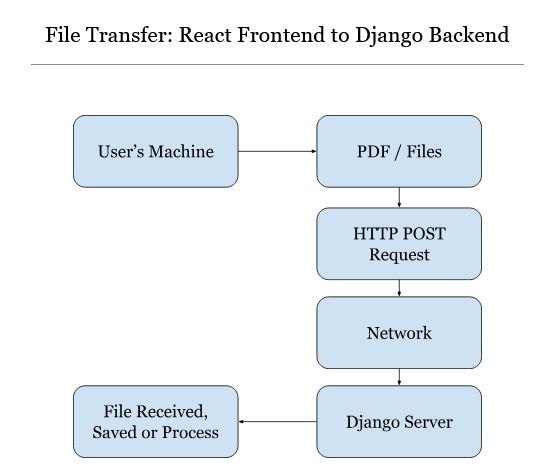
Your Machine (Browser) → HTTP POST Request → Django Server → File Received → File Saved or ProcessedStep-by-Step Breakdown
- File Selection — User picks a PDF from their machine. The file loads into browser memory.
- HTTP Request Preparation — React creates a POST request with
multipart/form-dataformat. - Network Transfer — The browser sends the request through multiple network layers to the Django server.
- Server Reception — Django receives the HTTP request containing the file data.
- Extraction & Processing — Django extracts the file and either saves it to storage or processes it.
The React Side
In React, you typically use FormData to prepare the file for upload:
const formData = new FormData();
formData.append('file', selectedFile);

fetch('/api/upload/', {
  method: 'POST',
  body: formData
});
Important: Don't set the Content-Type header manually when using
FormData. The browser will set it automatically with the correct boundary.
The Django Side
Django makes it easy to handle uploaded files:
def upload_file(request):
    if request.method == 'POST':
        uploaded_file = request.FILES['file']
        with open(f'uploads/{uploaded_file.name}', 'wb+') as dest:
            for chunk in uploaded_file.chunks():
                dest.write(chunk)
Why multipart/form-data?
Regular form submissions use application/x-www-form-urlencoded, which is inefficient for binary files.
multipart/form-data splits the request into multiple parts, each with its own content type,
allowing efficient transmission of both text fields and binary files in a single request.
Key Takeaways
- React is just the messenger — it doesn't store files
- Files travel via HTTP POST requests
- Use
multipart/form-datafor file uploads - Django's
request.FILESgives you access to uploaded files - Always validate and sanitize uploaded files on the backend